
Deposits without retyping your number
Save your bKash or Nagad number once and the app fills it in next time. The money lands in about 2 minutes, the minimum is ৳300, and a top-up between overs takes seconds.
One file, 52 MB, no store account and no computer. Download the cd80 app straight to your Android phone, sign in with the details you already use, and the whole lobby opens on your screen.
Prefer scanning? The QR code in the download section below points to the same file. iPhone users add the site to the Home Screen instead.
Your cd80 account, your ৳ balance and your bonus progress are the same in both places. The difference shows up in small moments: opening the lobby while you wait for a bus, or checking a cricket market between overs without hunting for the URL.
| Situation | cd80 app | Phone browser |
|---|---|---|
| Reaching the lobby | One tap on the home-screen icon | Type cd80.lat, then log in again |
| Staying signed in | Keeps you logged in until you sign out | Session drops when browsing data is cleared |
| Loading game art | Images are cached on the phone | Fetched fresh on every visit |
| bKash deposit | Hands off to bKash with your number saved | Same flow with more taps |
| Withdrawal updates | Push alert when the request clears | Nothing until you check the wallet |
| Games on offer | All 4,300 titles | All 4,300 titles |
| Welcome offer | 140% first deposit, up to ৳30,000 | Identical offer |
If the phone is shared with family, the browser is the safer habit: log out and clear the history when you finish. Everything else weighs towards the app once it is on your screen.
cd80 app · 3.8.16
One file, no store account and no waiting for a review. The APK is 52 MB and runs from Android 6.0 upwards, which covers the phones most players carry in Dhaka and Chattogram.
File: cd80.apk · 52 MB · version 3.8.16
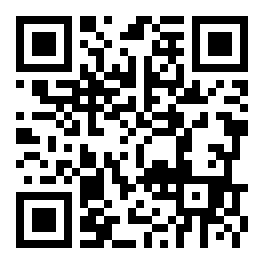
Aim your phone camera at the code and the same APK starts downloading. Useful if you are reading this page on a laptop.
| Version | 3.8.16 |
|---|---|
| File name | cd80.apk |
| File size | 52 MB |
| Minimum Android | 6.0 |
| Last updated | 10 November 2026 |
| Price | Free |
| Languages | English and Bangla |
| Payments | bKash, Nagad, Rocket, Bank Transfer |
If your phone reports a smaller file, the download broke on the way. Delete it and start again over WiFi.
The app carries the full library, not a cut-down version: 4,300 titles from Pragmatic Play, Habanero, JILI, KA Gaming, FA Chai, Red Tiger and Sexy Gaming, with the cricket and football markets sitting in the same menu.
Save your bKash or Nagad number once and the app fills it in next time. The money lands in about 2 minutes, the minimum is ৳300, and a top-up between overs takes seconds.
Withdrawals average 27 minutes. Instead of refreshing the wallet page, a notification arrives the moment your request is approved. The first one waits on KYC, which is reviewed in about 6 hours.
Game art is stored on the phone, so scrolling the lobby does not redraw every cover. Spins and dealer tables still need a live line, but the lobby stays usable when the signal dips.
Set a PIN or fingerprint on the app and nobody else in the house can open your wallet or your bet history. Worth doing when the phone gets passed around during a match.
New builds install straight over the old file. Your balance, bonus progress and saved payment number stay where they are, so you are not signing in from scratch or hunting for an old password.
Live chat sits in the app menu rather than behind a browser tab, and it runs 24/7. The agent opens your account details before you finish typing, which saves a round of questions.
Android lists the permissions before the first launch. Here is what each one is doing, so you can decide before you tap Install rather than after.
Holds the 52 MB install file, cached game art and your login token. It does not read your photos, documents or the rest of your downloads folder.
Used for bonus offers, withdrawal approvals and new-device login alerts. Each type can be switched off inside the app settings without breaking deposits.
Opens only when you photograph an NID, passport or driving licence for KYC. That check is required before your first withdrawal and is reviewed in about 6 hours.
Contacts, SMS, call logs, location, your bKash PIN or the OTP sent to your phone. No cd80 screen will request those, in the app or on the website.
The file is served from cd80.lat over HTTPS. Before installing, confirm the name reads cd80.apk, the size 52 MB and the version 3.8.16. A file with a different name did not come from us, whatever the message said.
Open Settings, then Apps, then Special access, then Install unknown apps. Pick the browser you download with, Chrome usually, and switch Allow on. This lets that one app open the installer.
Come back to this page and tap Download APK. Keep the tab open until it finishes; 52 MB takes a while on a busy line. Chrome shows progress in the notification shade, so you can leave the screen.
Open Downloads, tap cd80.apk, then Install. If Play Protect puts up a warning, choose More details and then Install anyway. Only do that for a file you took from this page.
Use the details you already have on the cd80 login screen. New here? Register with your mobile number and confirm the OTP. The same account works on the website, so nothing is duplicated.
Deposit at least ৳300 by bKash, Nagad or Rocket. The money shows in about 2 minutes and unlocks the 140% first deposit bonus up to ৳30,000, with 8x wagering before you withdraw.
Apple only installs apps from its own store, so the iPhone route is a shortcut on your Home Screen. It opens full screen, keeps you signed in, and reaches the same 4,300 games and the same ৳ wallet.
Almost every failed install comes down to four things: a broken file, a permission that was never granted, an in-app browser, or a phone below Android 6.0. Find your message in the table.
| What you see | Why it happens | What fixes it |
|---|---|---|
| App not installed | The APK is incomplete, or the phone is out of storage space. | Delete the old download, free some space, then take the file again from this page and check it reads 52 MB before tapping it. |
| Blocked by Play Protect | Android flags anything installed outside the Play Store by default. | Tap More details, then Install anyway. Do this only for a file from cd80.lat; a copy from a Telegram group deserves that warning. |
| Install button is greyed out | The browser has no permission to install apps, or the phone runs something older than Android 6.0. | Grant Allow in Settings, Apps, Special access, Install unknown apps. Still grey? Check About phone to confirm the Android version. |
| Download stops halfway | In-app browsers block APK files, and some WiFi networks cut large downloads. | Copy the link into Chrome or open cd80.lat/cd80-app/ there, and stay on WiFi until the file finishes downloading. |
| Login fails after install | The password is wrong, or the number was registered under a different spelling. | Reset it on the cd80 login page or open live chat. The app reads the same account as the website, so nothing was lost. |
None of these fit? Live chat is open 24/7 and can check whether your mobile number is already tied to an account.
Yes, when you take it from this page. The file is 52 MB, version 3.8.16, and it is served from cd80.lat over HTTPS. Confirm both details on your phone before tapping Install. Copies passed around Telegram groups or hidden behind link shorteners can carry extra code, so skip them even when the name looks right.
No. The app signs into the same account as the website, so your ৳ balance, bonus progress and KYC status come with you. If you have never registered, create the account once on the cd80 register page and use those details in the app. Two accounts would split your wagering, which is never useful.
Download the new APK from this page and install it over the old one. Android keeps your data, so you stay signed in and bonus progress is untouched. The current build is 3.8.16, updated 10 November 2026, and the version number is printed in the app menu. There is no in-app update button to hunt for.
Only for identity checks. Before your first withdrawal you upload a photo of an NID card, passport or driving licence, and the camera takes that shot. The review takes about 6 hours. You can deny the permission and still play, but the withdrawal will sit in the queue until the document arrives.
There is no iOS file to install. Apple only allows apps from its own store, so iPhone users add cd80 to the Home Screen from Safari instead. It opens full screen, keeps you signed in, and reaches the same 4,300 games and the same wallet. The one thing missing is the push notification, so check the wallet page yourself.
The app, in most cases. Game covers are stored on the phone after the first load, while a browser pulls the lobby down again on every visit. Live dealer tables and slot spins are streamed either way, so both need a steady connection. On a 4G pack, the saving shows up mainly in browsing.
The app sends the same request to the same team, so timing does not change: about 27 minutes on average, with a ৳800 minimum and a ৳70,000 daily cap at the entry level. Your very first withdrawal can take up to 2 hours while the KYC check clears, so send the document early.